Most e-reader accessories are bought in the first week and used in the second. Only a few change how you read. Here is the short list, with the reasoning, so you can spend less and keep what you use.
Start with the device
An accessory that does not fit is a drawer filler, so the screen size comes first. Our two picks are the Kindle Paperwhite (16 GB), with a 7-inch glare-free display, an adjustable warm light and weeks of battery, and the Kindle (16 GB), which is smaller and lighter, with a 6-inch screen and a brighter adjustable front light. Both link below, and both are paid links: we earn a commission if you buy on Amazon.
Both have 16 GB, which holds roughly 4,000 to 10,000 novels. We did the math in how many books a 16 GB Kindle holds.
-

Kindle Paperwhite (16 GB)
Our default pick: a 7-inch glare-free screen, adjustable warm light and weeks of battery.
Sold on Amazon · paid link, the price is shown there
See it -

Kindle (16 GB)
The budget pick: smaller and lighter, with a 6-inch screen and the same 16 GB.
Sold on Amazon · paid link, the price is shown there
See it
Worth buying
A sleeve that matches your screen
A sleeve is for the bag, not for reading. It keeps the screen away from keys, chargers and whatever else lives in there. Ours has a magnetic flap and a soft suede-feel finish, and it comes in four sizes: 6 inch, 6.8 inch, 7 inch and 10.2 inch for the Kindle Scribe. The one rule is to pick the size of your screen.
A page-turner remote, if you read lying down
This is the accessory that changes how you read, if you read in bed. A clip goes on the edge of the screen, and when you press the button on the small remote the clip taps the screen. It uses no Bluetooth or wifi, and there is no app. It works with Kindle, Kobo, phones and tablets with a touch screen, for devices up to 0.45 in (1.1 cm) thick, case included, so a thick case can rule it out. Some older Kindle models do not work, and the product page lists them.
Something to show the shelf you cannot see
A stack of paperbacks shows how far you have come, and an e-reader does not. A notebook fixes that, or a reading journal. If you want to colour one spine per book, the 52-spine bookshelf tracker in our 2027 Reading Challenge Kit does it. It is our own product, so weigh that.
-
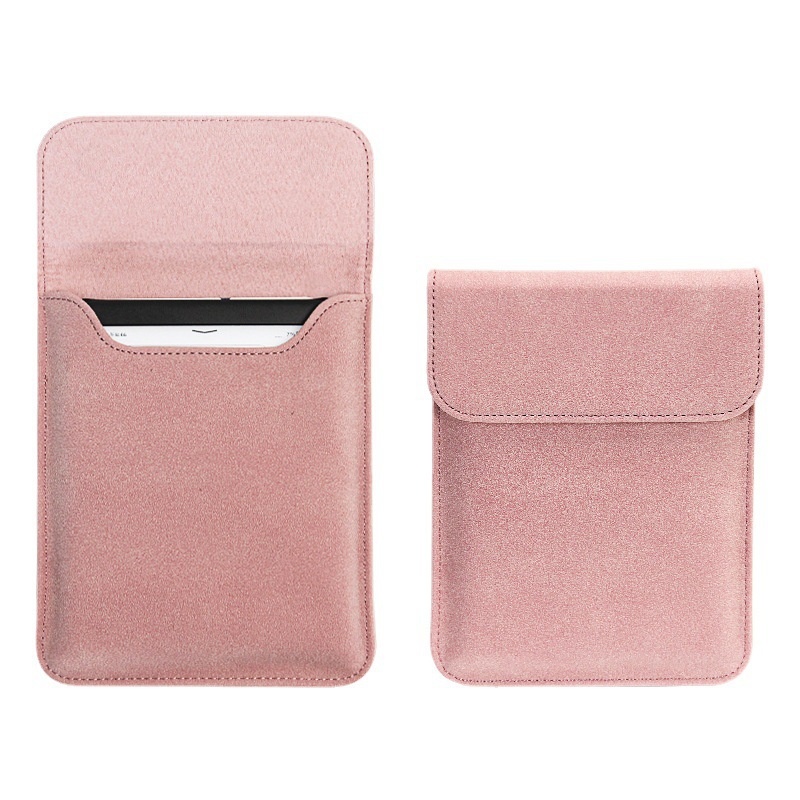
Kindle Magnetic Sleeve
$17.99
A soft sleeve with a magnetic flap, in 6", 6.8", 7" and Kindle Scribe 10.2" sizes.
Standard US shipping included · other countries quoted at checkout
See it -
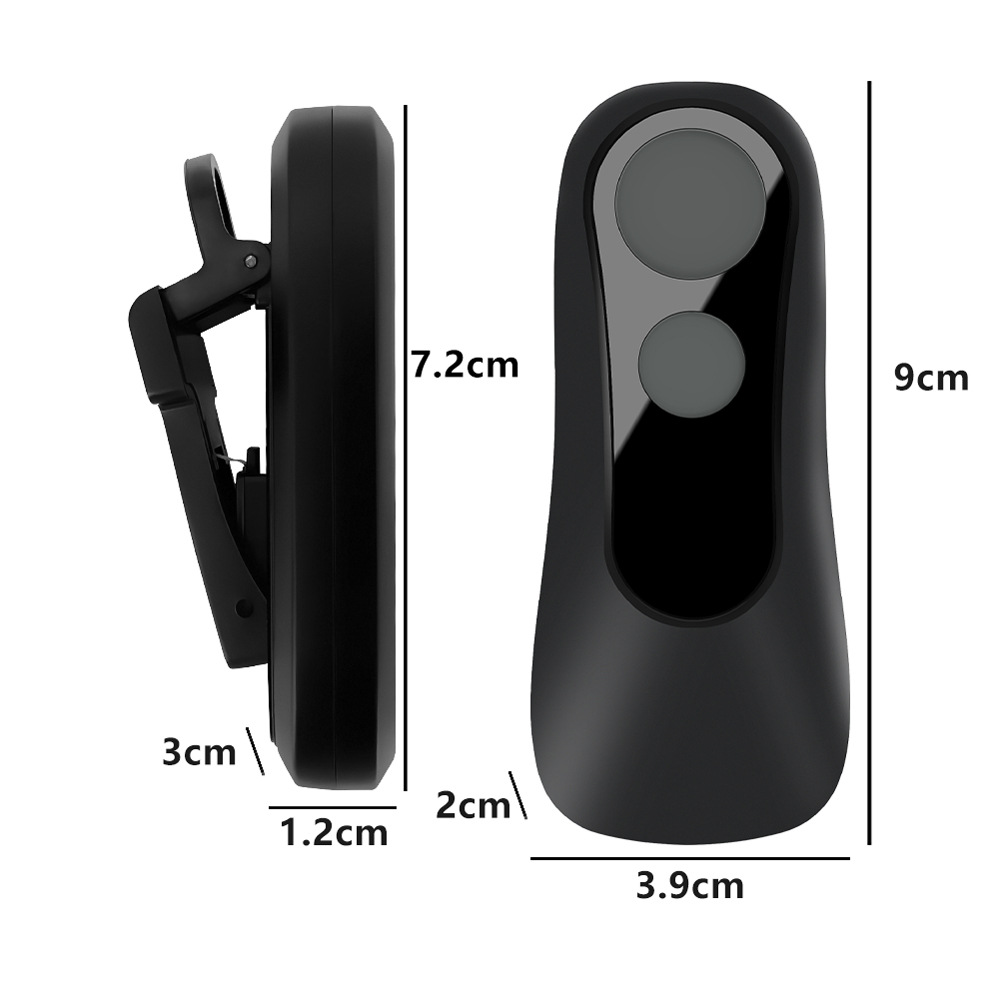
Kindle Page Turner Remote
$14.99
A clip and a small remote that turn the page for you, with no Bluetooth, wifi or app.
Standard US shipping included · other countries quoted at checkout
See it
Three to skip
A clip-on reading light
Both of our picks have an adjustable front light built in. A clip-on light is for paper books read in a dark room, and for those we have a book accessories collection. Check your own model before you buy one.
More storage, out of worry
Sixteen gigabytes is plenty for novels. More storage only matters if you keep comics, manga or audiobooks on the device. Your books also stay in your Amazon library, so removing one does not lose it.
A heavy case for a device that lives in a bag
If your e-reader mostly rides in a bag, a sleeve is lighter and does the job. A thick case adds weight and, as above, can stop a page-turner remote from working.
The short version
| Accessory | Worth it if | Skip it if |
|---|---|---|
| Sleeve | Your e-reader travels in a bag | It stays on the nightstand |
| Page-turner remote | You read lying down, with your hands under the blanket | Your model is on the list that does not work |
| Reading log | You want to see your progress | You already keep a list you use |
| Clip-on light | You read paper books in the dark | Your e-reader has a front light |
| More storage | You keep comics or audiobooks on it | You read mostly novels |
All the e-reader pieces are in one place: the e-reader accessories collection. And if you read in bed, our guide on reading without holding the book covers the rest.
As an Amazon Associate we earn from qualifying purchases. Prices and availability are shown on Amazon.
Questions
What accessories do I need for a Kindle?
Not many. A sleeve that matches your screen size is the one most readers use. A page-turner remote helps if you read lying down. Most of the rest is optional, and some things, like a clip-on reading light, are not needed on a Kindle with a built-in front light.
What size Kindle sleeve do I need?
Match the size to your screen. Our Kindle Magnetic Sleeve comes in 6 inch, 6.8 inch, 7 inch and 10.2 inch for the Kindle Scribe.
Is a sleeve or a case better?
A sleeve protects the device in a bag but is taken off to read. A case stays on while you read, and some wake and sleep the screen when you open and close them. If your e-reader mostly travels in a bag, a sleeve is lighter and enough.
Can I turn pages without touching the screen?
Yes. The Kindle Page Turner Remote has a clip on the edge of the screen that taps it when you press the button on the remote. It uses no Bluetooth, no wifi and no app. Some older Kindle models do not work, so check the product page.
Do I need a reading light for my Kindle?
Not if it has a built-in front light. Our two picks, the Kindle Paperwhite and the Kindle, both have an adjustable front light. Check your own model.